Mastering the Slice 3D Text Effect with Editable Text for Modern Design
Typography has always been a cornerstone of visual communication, but in recent years, the demand for three-dimensional text treatments has surged. Among the most versatile and visually arresting techniques is the Slice 3D Text Effect. This approach gives letters depth, dimension, and a sense of being physically cut or layered — often appearing as if a blade has sliced through the type to reveal internal geometry, shadows, or contrasting colors. What makes this technique even more powerful is when it is paired with Editable Text. Keeping the text fully editable within your design software means you can iterate quickly, adapt to client feedback, and maintain a non-destructive workflow. Whether you are a graphic designer, motion artist, or web creator, understanding how to harness the Slice 3D Text Effect with editable text can elevate your projects significantly.
What Is the Slice 3D Text Effect?
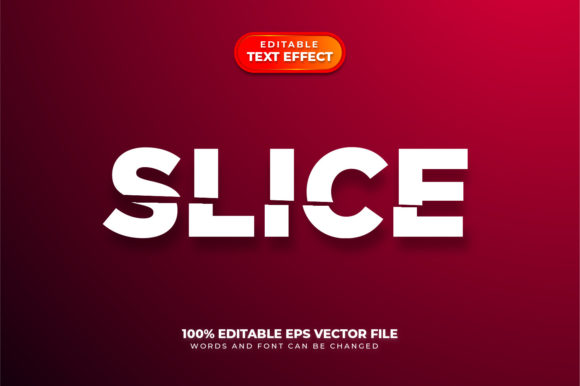
At its core, the Slice 3D Text Effect is a stylistic treatment that makes typography appear as though it has been divided into separate segments. These segments may be offset, angled, or separated by gaps to reveal a three-dimensional interior. The effect mimics a physical cut or dissection of the letterforms, giving them a modern, architectural feel. Unlike simple drop shadows or bevels, the slice effect introduces a sense of structure and movement.
The magic lies in how the slices interact with light and perspective. Each segment can have its own shading, texture, or color gradient, making the text pop off the page or screen. When executed well, the Slice 3D Text Effect can transform flat typography into a focal point that commands attention. It is particularly popular in poster design, title sequences, logo animations, and digital art where a futuristic or industrial aesthetic is desired.
But here is the critical nuance: the effect is only as useful as your ability to modify it. If the text becomes rasterized or converted to shapes prematurely, you lose the ability to change words, fix typos, or experiment with different phrasing. That is why working with Editable Text throughout the process is not just a convenience — it is a strategic necessity.
The Value of Keeping Text Editable in 3D Workflows
When you build a Slice 3D Text Effect using live, editable type layers, you retain enormous flexibility. In software like Adobe Photoshop, Illustrator, or After Effects, you can apply layer styles, 3D extrusions, or slicing masks while keeping the original text layer intact. This means that changing the word from "DESIGN" to "CREATE" takes seconds, not hours. The alternative — recreating the entire effect from scratch after every revision — is a productivity killer.
In professional settings, client feedback often involves last-minute copy changes. Imagine a branding project where the tagline shifts slightly after the client sees the mockup. If your Slice 3D Text Effect relies on baked-in paths or rasterized layers, you might need to rebuild the entire composition. With editable text, you simply update the text string, and the 3D slices adjust automatically — provided your workflow is set up correctly. This keeps projects on schedule and reduces frustration.
Moreover, editable text allows for dynamic scaling and alignment adjustments. You can resize the text, adjust kerning, or change the font without breaking the slice geometry. This is especially valuable when working with responsive layouts or multi-language versions. The same Editable Text approach also facilitates easy experimentation with different typefaces, weights, or styles to see how they interact with the 3D effect.
Non-Destructive Techniques for Slice 3D Text
To maintain editability, designers often use smart objects, layer comps, or expression-driven controls. In Photoshop, you can convert your text layer to a smart object before applying filters or transformations. This preserves the raw text data inside the smart object. In Illustrator, you can use appearance panels and effects that remain linked to the original type. In After Effects, text animators and 3D layers allow you to separate letters or slices while keeping the text source editable. These methods ensure that the Slice 3D Text Effect remains flexible, not frozen.
How the Slice 3D Text Effect Fits into Modern Design Projects
The applications for this effect span across industries and media. Let's explore a few key areas where it shines.
Branding and Logo Design
Brands often need a distinctive wordmark that stands out in crowded markets. A Slice 3D Text Effect can give a logo a unique, cutting-edge personality. For tech startups, gaming companies, or fashion labels, the sliced look conveys precision, innovation, and energy. Because the effect is highly customizable, you can align it with brand colors, gradients, and visual language. And because you keep the text editable, you can refine the logo through multiple rounds of feedback without losing the core design.
Motion Graphics and Title Sequences
In video production, title animations often rely on 3D typography. The Slice 3D Text Effect works beautifully in lower thirds, opening titles, or promotional videos. Each slice can animate independently — sliding apart, rotating, or fading in sequentially. When the text remains editable, you can reuse the same animation template for different episodes, clients, or languages. This efficiency is a game-changer for motion designers working on tight deadlines.
Web and UI Design
Web designers have also embraced 3D text effects, though they must balance visual impact with performance. Using CSS techniques, canvas elements, or WebGL, you can create sliced text that renders in the browser. While editable text in web contexts can be trickier to maintain, many tools now support dynamic text layers that map to 3D geometries. A hero section with a Slice 3D Text Effect can immediately communicate a brand's forward-thinking attitude, while keeping the underlying text accessible and editable for content updates.
Print and Poster Art
For print projects like concert posters, magazine covers, or product packaging, the Slice 3D Text Effect adds a tactile, dimensional quality. Even though the final output is flat, the illusion of depth draws the eye. Designers often combine the sliced effect with metallic gradients, paper textures, or neon colors. Because print files need to be high-resolution, working with editable text ensures that any last-minute text changes don't force a full re-render of complicated 3D layers.
Practical Benefits and Considerations for Designers
Adopting a workflow centered around Editable Text and the Slice 3D Text Effect comes with several concrete advantages, as well as a few trade-offs worth understanding.
- Speed of iteration: As mentioned, editing text without rebuilding the effect is a massive time saver. You can test multiple headlines, taglines, or names in minutes.
- Consistency across variations: If you need to produce a series of graphics (e.g., social media posts for different products), a template with editable text ensures consistent styling.
- Client confidence: When clients see that you can implement changes instantly, they trust your process and are more likely to approve work quickly.
- Scalability: Editable text layers respond well to scaling, resolution changes, and different output formats, as long as the effect is built with vector or resolution-independent methods.
- Learning curve: One consideration is that setting up a truly editable 3D slice effect requires knowledge of your software's capabilities. You may need to learn smart objects, expressions, or linked assets. However, this upfront investment pays off in the long run.
- File size and complexity: Maintaining editability sometimes results in larger file sizes or more complex layer structures. Organizing your layers with clear naming and grouping helps manage this.
- Rendering limitations: In some software, real-time preview of 3D effects can be resource-intensive. You may need to balance visual fidelity with performance, especially if your machine has limited GPU power.
Recommendations for Getting Started
If you are new to the Slice 3D Text Effect, begin with a simple word or phrase. Choose a bold, sans-serif typeface — it will handle slicing and perspective better than delicate scripts. Start by duplicating your text layer and applying offset positioning or masking to create the slice illusion. Add subtle gradients or shadows to each slice to enhance depth. Always keep one version of the text layer untouched and editable as your source. Use adjustment layers or global styles so that changes propagate automatically.
For motion projects, consider using After Effects' built-in text animators combined with 3D layer controls. You can even use the "Slice" effect (available in some plugins) to generate clean cut lines. The key is to avoid "baking" the text into a shape until the very end of your workflow, if at all. Many professional designers never convert to outlines unless the final output requires it for font licensing or special effects.
Another observation: the Slice 3D Text Effect works exceptionally well when combined with other design elements like geometric backgrounds, light leaks, or particle systems. The contrast between structured typography and organic visuals creates a compelling tension. Keep your color palette restrained — often two or three colors — so the slicing remains the hero.
Common Questions and Practical Scenarios
Designers frequently ask about the best software for this effect. While Photoshop and Illustrator are popular, don't overlook dedicated 3D tools like Blender or Cinema 4D. In those environments, you can model text with geometry and apply boolean operations to create realistic slices. The trade-off is that keeping text editable in a 3D application requires careful use of text objects or linked labels. However, many 3D artists find the extra control worth it for photorealistic renders.
Another scenario: you might need to generate a Slice 3D Text Effect for a client who will update the text themselves. In that case, providing a template with clear instructions and locked effect layers becomes essential. Tools like Adobe XD or Figma also support basic 3D transformations, though their capabilities are more limited. For maximum flexibility, stick with the Adobe Creative Cloud ecosystem or standalone 3D software.
Finally, consider the audience. A sliced 3D effect can feel edgy and modern, but it may not suit every brand or message. A luxury fashion label might prefer a refined, subtle version of the effect, while a gaming studio might go for an aggressive, fragmented look. Always let the content and context guide your design decisions. The beauty of using Editable Text is that you can easily explore different tonalities without starting from scratch.
Final Thoughts on a Dynamic Technique
The Slice 3D Text Effect is more than a trend — it is a powerful tool in the modern designer's arsenal. Its ability to convey depth, motion, and structure makes it ideal for a wide range of projects, from logos to animations to print. By committing to a workflow that prioritizes Editable Text, you ensure that your creativity is never bottlenecked by technical constraints. You gain the freedom to experiment, adapt, and refine until the typography perfectly serves the message. Whether you are a seasoned professional or just beginning to explore 3D typography, the slice effect offers a rich field for innovation. Start with a simple test, keep your text live, and see where the cuts take you.